


Confirm Your Request
Please fill in your details to proceed
SHA USSD Code *147#: Menu, Steps and Every Option Explained (2026)
The SHA USSD code is *147#. Dial it from your phone, pick your ID type, enter your ID number and the Taifa Care menu opens. It works without data or a smartphone. From there you can pay, check eligibility, update details, appeal your contribution and more.
This guide shows every screen of the *147# menu with real screenshots, what each number does, and where to go for the full steps.
Quick Answer: dial *147# → choose 1 Kenyan Citizen (or 2 Foreign Resident, 3 Refugee) → enter your ID number → pick from the menu: 1 Make Payment, 2 Eligibility, 3 Update Details, 4 Contributions Appeal, 5 My Profile, 98 More.
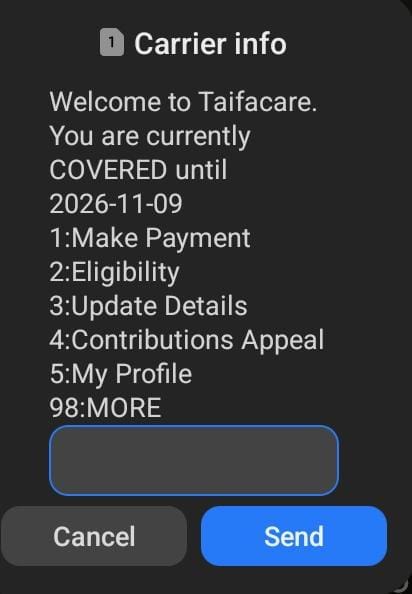
Your cover status shows first. The top line of the menu reads “You are currently COVERED until” followed by a date, so one dial tells you whether your cover is active.
How to Use the SHA USSD Code *147# (Step by Step)
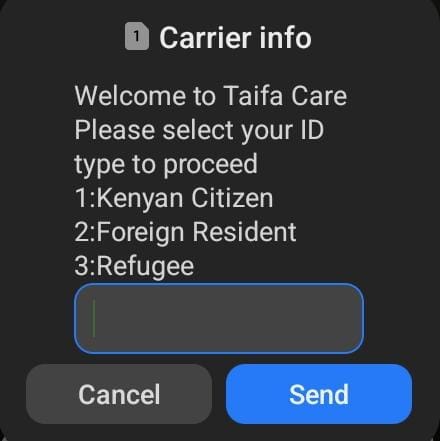
The screen greets you with “Welcome to Taifa Care” and asks for your ID type: 1 Kenyan Citizen, 2 Foreign Resident or 3 Refugee. Reply with the number and press Send.
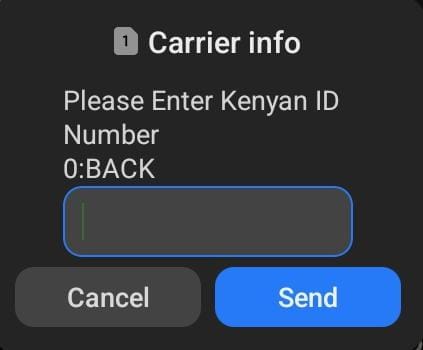
Type the ID number that matches the ID type you chose. Type 0 to go back.
If your ID is registered, you go straight to the main menu. It shows your cover status and six choices. There is no password to type.
If your ID is not registered yet, the prompts take you into sign-up instead. Follow our guide on how to register for SHA.
SHA USSD Menu Options at a Glance
| Press | Option | Use it to |
|---|---|---|
| 1 | Make Payment | Pay for yourself, join Lipa Pole Pole, or pay for someone else |
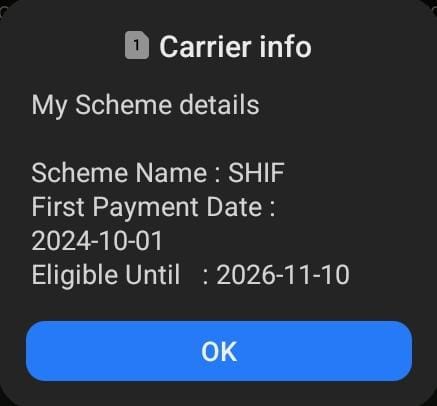
| 2 | Eligibility | See your scheme, first payment date and eligible-until date |
| 3 | Update Details | Change your phone number, or update spouse and dependants |
| 4 | Contributions Appeal | Ask SHA to review a contribution that is too high |
| 5 | My Profile | View your profile details |
| 98 | More | Open further options, including 6 Calculate Contribution |
Option 1: Make Payment
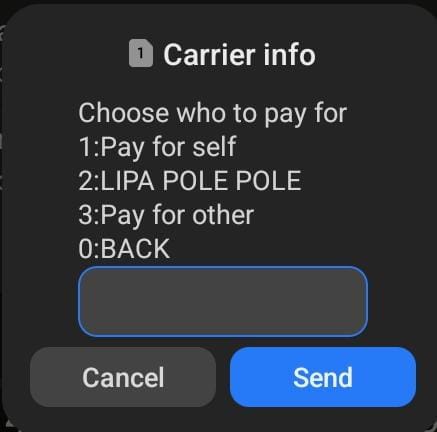
Choose 1 and SHA asks who you are paying for: 1 Pay for self, 2 Lipa Pole Pole, 3 Pay for other.
- Paying for yourself: see how to pay your SHA monthly contribution and paying SHA via M-Pesa.
- Paying in instalments: read how SHA Lipa Pole Pole works.
- Paying for family or a friend: see paying SHA for another person.
Option 2: Eligibility
Choose 2 and “My Scheme details” appears with your scheme name, first payment date and eligible-until date. This is the quickest check that your cover is active.
Prefer a browser? Use the SHA eligibility check. If the date has passed, see what to do when SHA cover lapses.
Option 3: Update Details
Choose 3, then 2 Update details on the next screen. (Option 1 there is Personal Profile.)
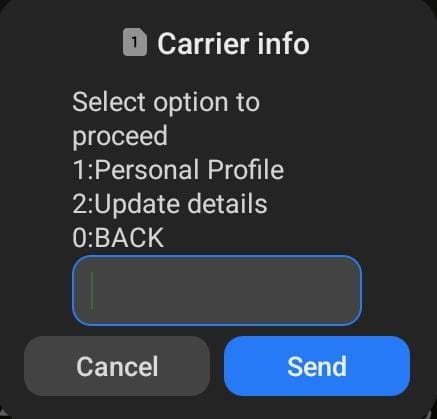
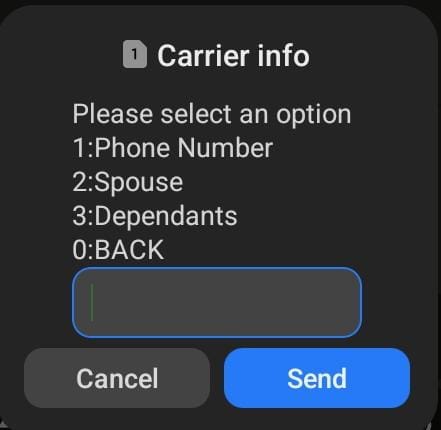
You then pick what to update: 1 Phone Number, 2 Spouse, 3 Dependants.
- Phone number: how to change your SHA phone number.
- Spouse: how to add a spouse on SHA.
- Children and other dependants: SHA dependants registration.
Option 4: Contributions Appeal
Choose 4 to ask SHA to review your contribution amount from your phone. It is the USSD route to Punguza Malipo. Have your income details ready before you start.
- Full steps and what to prepare: SHA Punguza Malipo and how to reduce your SHA contributions.
- How the review is assessed: the SHA means test.
- Already appealed and nothing changed: SHA appeal taking too long.
Option 5: My Profile
Choose 5 to open your SHA profile. To correct personal details, see how to update your SHA personal details.
Option 98: More Options
Choose 98 for further options. The next screen shows 6 Calculate Contribution.
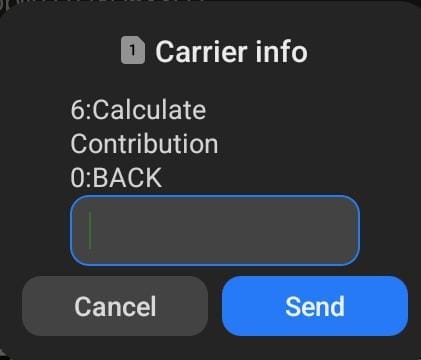
To work out your amount on screen first, use the SHA deduction rates calculator or read SHA monthly contribution rates.
If *147# Does Not Work
Menu does not load
Hang up, wait a minute and dial *147# again. Make sure you typed the asterisk and the hash.
ID not accepted
Check the ID type matches your document and every digit is right. Type 0 to go back and retry.
Prompts ask you to register
Your ID may not be on SHA yet. See how to register for SHA.
Need a person
Use the SHA customer care number, or tap a service at the top of this page.
*147# or the Afya Yangu App?
USSD is best when you have no data or only need a quick action. For a full view of your account, use the Afya Yangu app or the SHA member portal login. To see what you have paid so far, check your SHA contribution history.
Frequently Asked Questions
What is the SHA USSD code?
The SHA USSD code is *147#. Dial it, choose your ID type, enter your ID number and the Taifa Care menu opens.
What can I do with *147#?
You can make a payment, check eligibility, update your phone number, spouse or dependants, appeal your contribution, view your profile, and calculate a contribution under 98 More.
Do I need internet or a smartphone to use *147#?
No. USSD works from the dial pad, so you do not need data or a smartphone.
Is there a SHA USSD code login?
There is no password. You select your ID type and enter your ID number, and if it is registered the main menu opens.
How do I know if my SHA cover is active on *147#?
The top line of the main menu says whether you are covered and until what date. Option 2 Eligibility shows your scheme details and eligible-until date.
How do I change my phone number with *147#?
Dial *147#, enter your ID, choose 3 Update Details, then 2 Update details, then 1 Phone Number. See the phone number guide for the full steps.
How do I appeal my SHA contribution on *147#?
Choose 4 Contributions Appeal from the main menu. See SHA Punguza Malipo for what to prepare.
Which ID types does *147# accept?
Kenyan Citizen, Foreign Resident and Refugee.
Is there an app instead of USSD?
Yes. The Afya Yangu app gives you SHA services on a smartphone.
Disclaimer: MyCyber (mycyber.co.ke) is an independent educational website. We are not affiliated with the Social Health Authority (SHA), the Ministry of Health, or the Government of Kenya. Menu screens shown were captured in October 2026 and may change. Always verify current requirements directly with SHA before taking action. SHA toll-free: 0800 720 601. Source: SHA official portal (sha.go.ke), Afya Yangu portal, Social Health Insurance Act 2023.
