


SHA Means Test Kenya
The SHA Means Test Kenya is the assessment on afyayangu.go.ke that determines your monthly SHA contribution amount. It is required for all self-employed and unemployed Kenyans — and until you complete it, your SHA status stays Pending and you are not covered. This page documents every question asked, what to expect, and exactly how to complete it.
1. What Is the SHA Means Test?
The SHA Means Test — officially called the SHA Insurance Premium Assessment on afyayangu.go.ke — is a digital questionnaire that determines how much you contribute to SHA every month. Instead of charging every Kenyan the same amount, SHA uses this test to calculate a fair premium based on your actual household’s ability to pay.
The system evaluates your socio-economic status by asking about your housing conditions, the assets your household owns, your income sources, and your spending patterns. It then cross-references some of your answers with data from KRA, NTSA, and mobile money providers to verify accuracy.
The Means Test has three steps:
- Step 1 — Education Background: Your highest level of education
- Step 2 — Household Characteristics: 23 questions about your home, assets, and household
- Step 3 — Confirm Details: Review and submit your answers
Important: The SHA Means Test is the second and final step of registration. If you have not yet started registration at all, read our SHA registration guide first, then come back here to complete the Means Test.
2. Who Must Complete the SHA Means Test?
The Means Test is required for self-employed and unemployed Kenyans — anyone who is not on a formal payroll. This includes:
- Boda boda riders, matatu operators, and other transport workers
- Traders, shopkeepers, mama mbogas, and market vendors
- Freelancers, consultants, and online workers
- Casual labourers and subsistence farmers
- Unemployed adults and those between jobs
- Anyone who registered via *147# and whose status still shows Pending
Dialling *147# only starts your registration. It does not complete it. Until you finish the Means Test on afyayangu.go.ke, your SHA status remains Pending and you cannot access SHA benefits at any hospital. This is the single most common reason people think they are registered but are turned away.
3. What You Need Before You Start
The Means Test is done entirely online at afyayangu.go.ke. Before you begin, make sure you have the following ready:
What to Have Ready
The test asks about your household — have honest answers to these ready before you start:
- Your afyayangu.go.ke login — National ID and password
- Your highest level of education — primary, secondary, college, or university
- Details about your house — roof material, wall material, floor material, and water source
- A list of assets you own — TV, phone type, motorcycle, car, livestock
- Your approximate monthly airtime spend
- Whether your household receives any government or NGO assistance
- The land size your household owns (if any) in acres
You can complete the test on a smartphone browser — no app is needed. A stable internet connection is recommended so you do not lose progress between sections.
4. Step 1 — Education Background
The first step of the SHA Means Test asks about the highest level of education of the household head. This is used as one of the indicators of socio-economic status.
How to Get to the Means Test
Log into afyayangu.go.ke and navigate to the Means Test section.
- Go to afyayangu.go.ke and log in with your National ID and password
- On your dashboard, click My Profile
- Navigate to the Income or Means Test section
- Click Start Assessment — the SHA Insurance Premium Assessment opens
- Step 1 asks for the household head’s highest education level — select from the dropdown and click Next
5. Step 2 — Household Characteristics (All 23 Questions)
Step 2 is the main section of the SHA Means Test. It contains 23 questions about your household. Below is every question on the form — exactly as it appears on afyayangu.go.ke — so you know what to expect before you start.
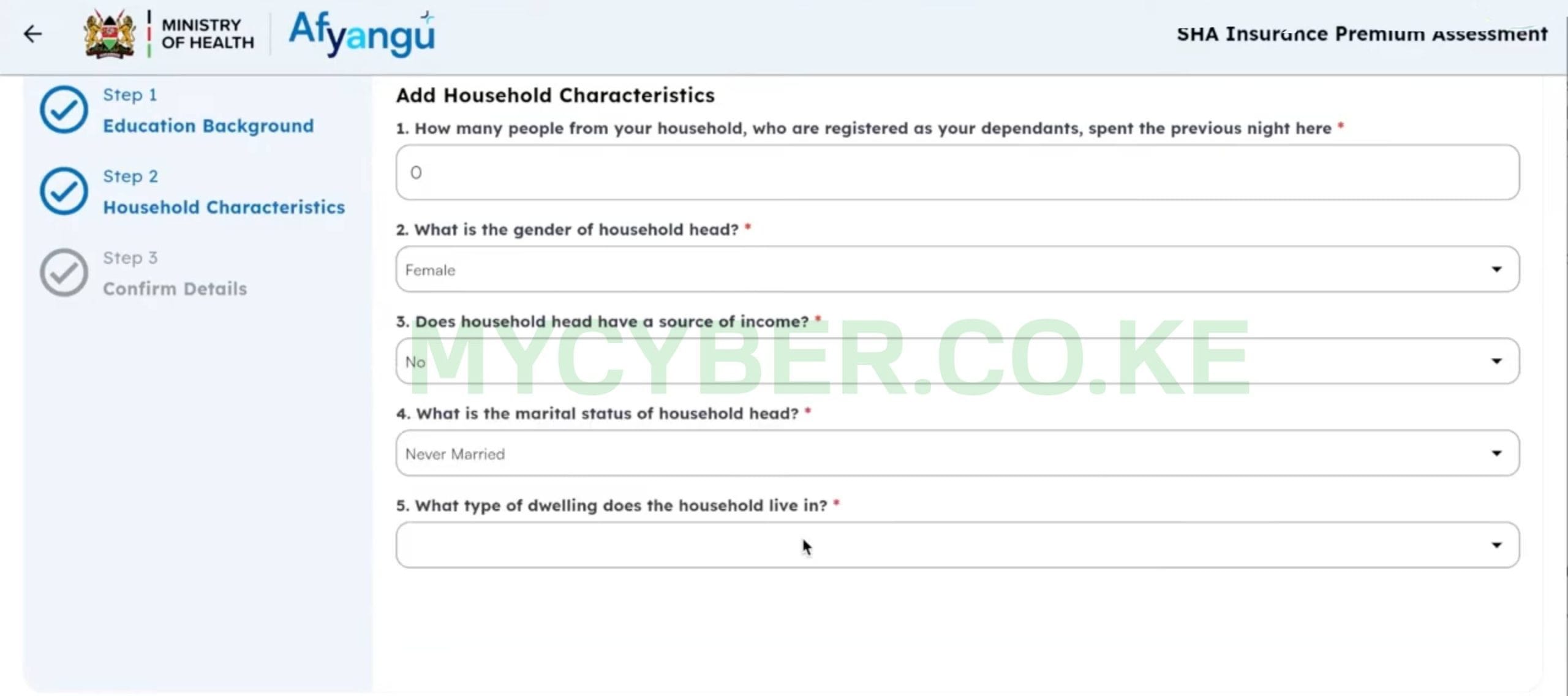
🏠 Housing and Household
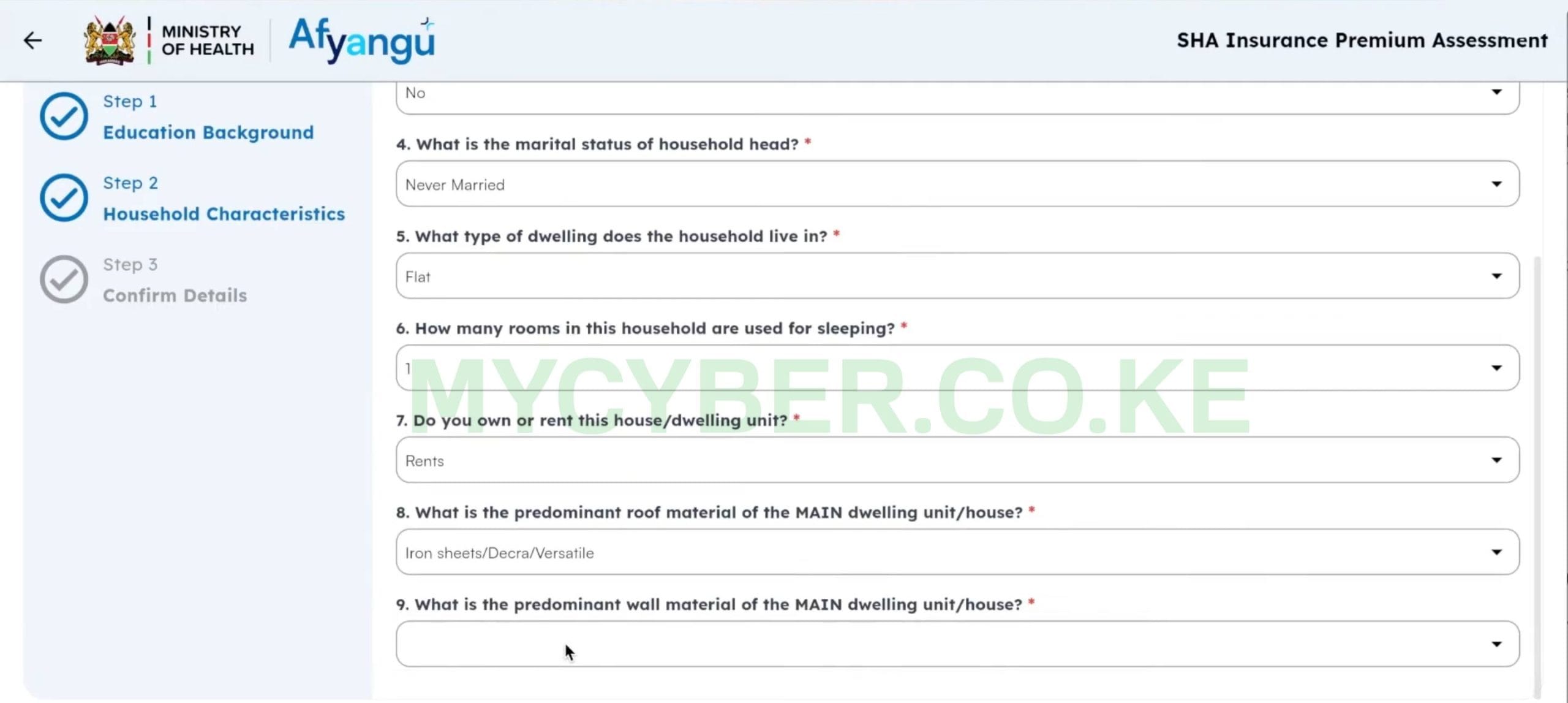
🏠 Housing and Household
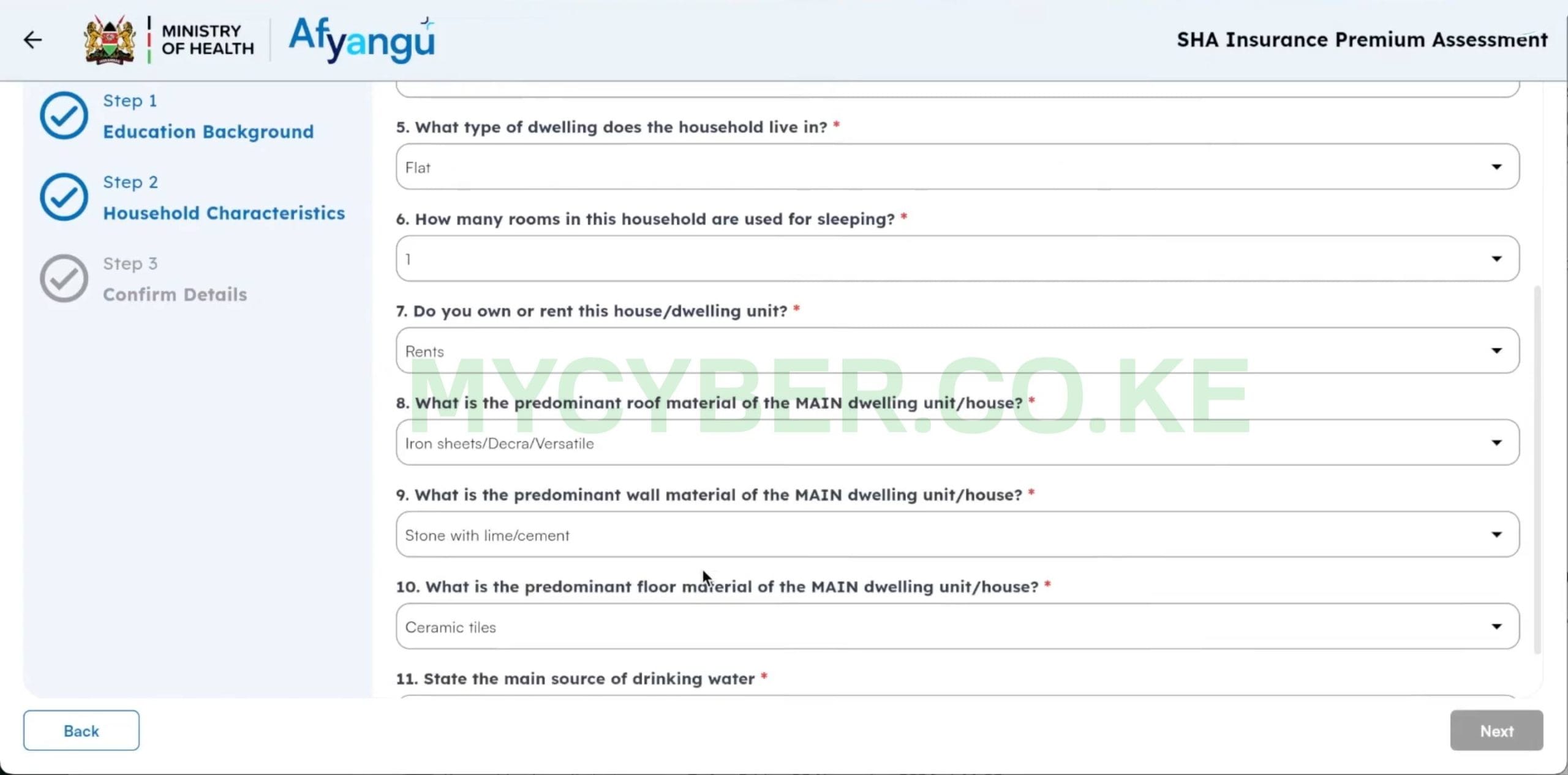
🏠 Housing and Household
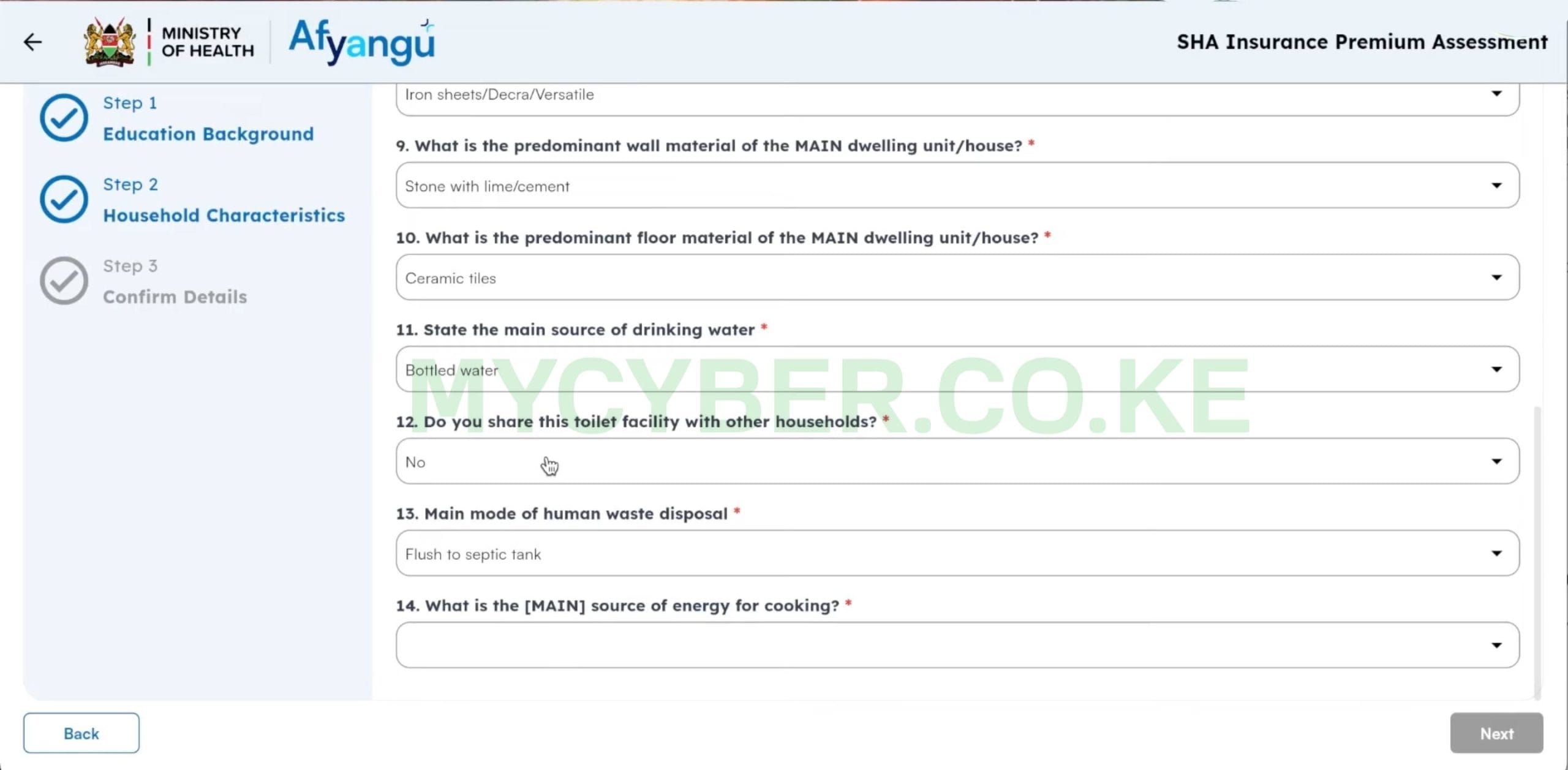
🏠 Housing and Household
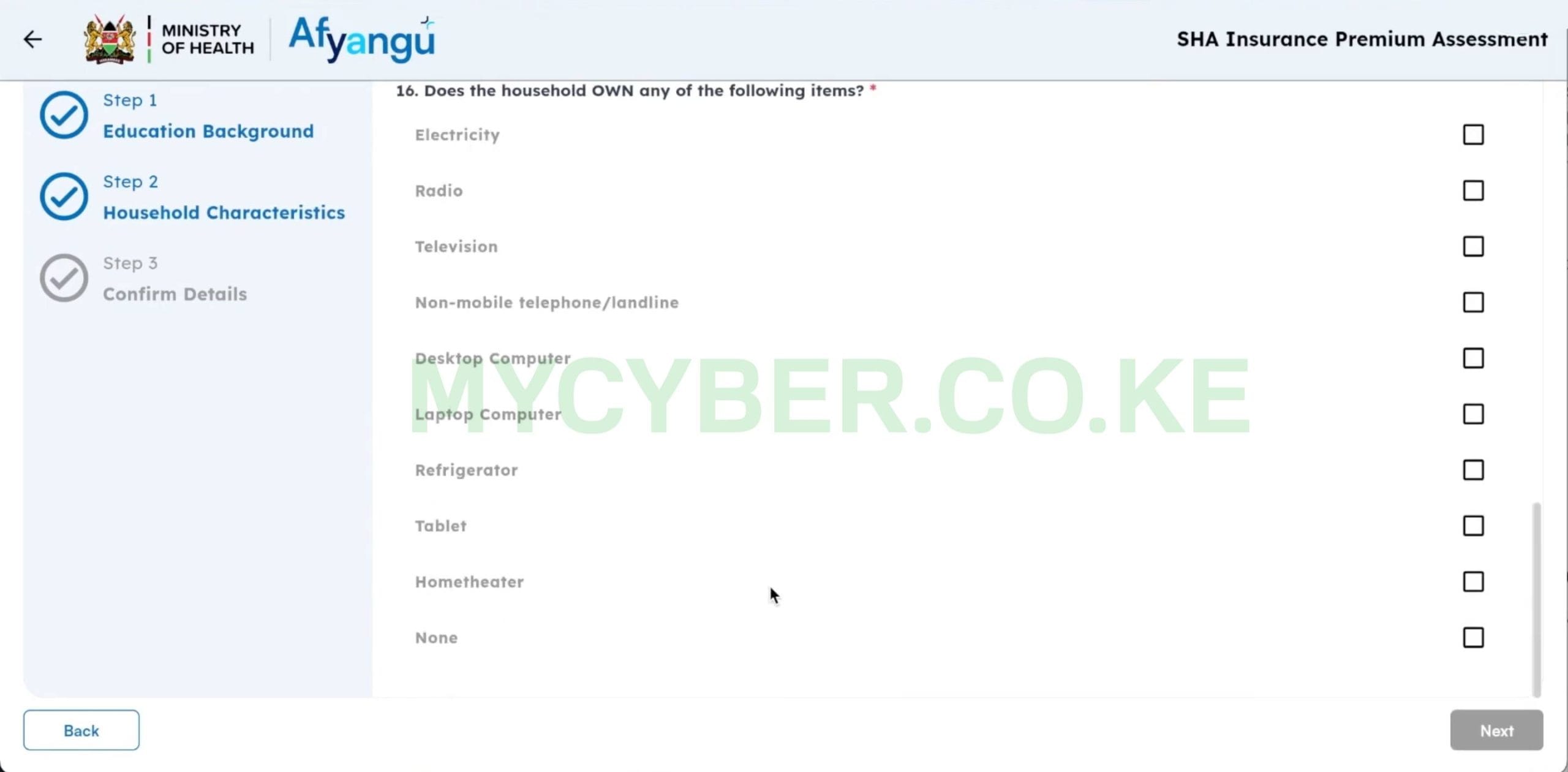
🏠 Housing and Household
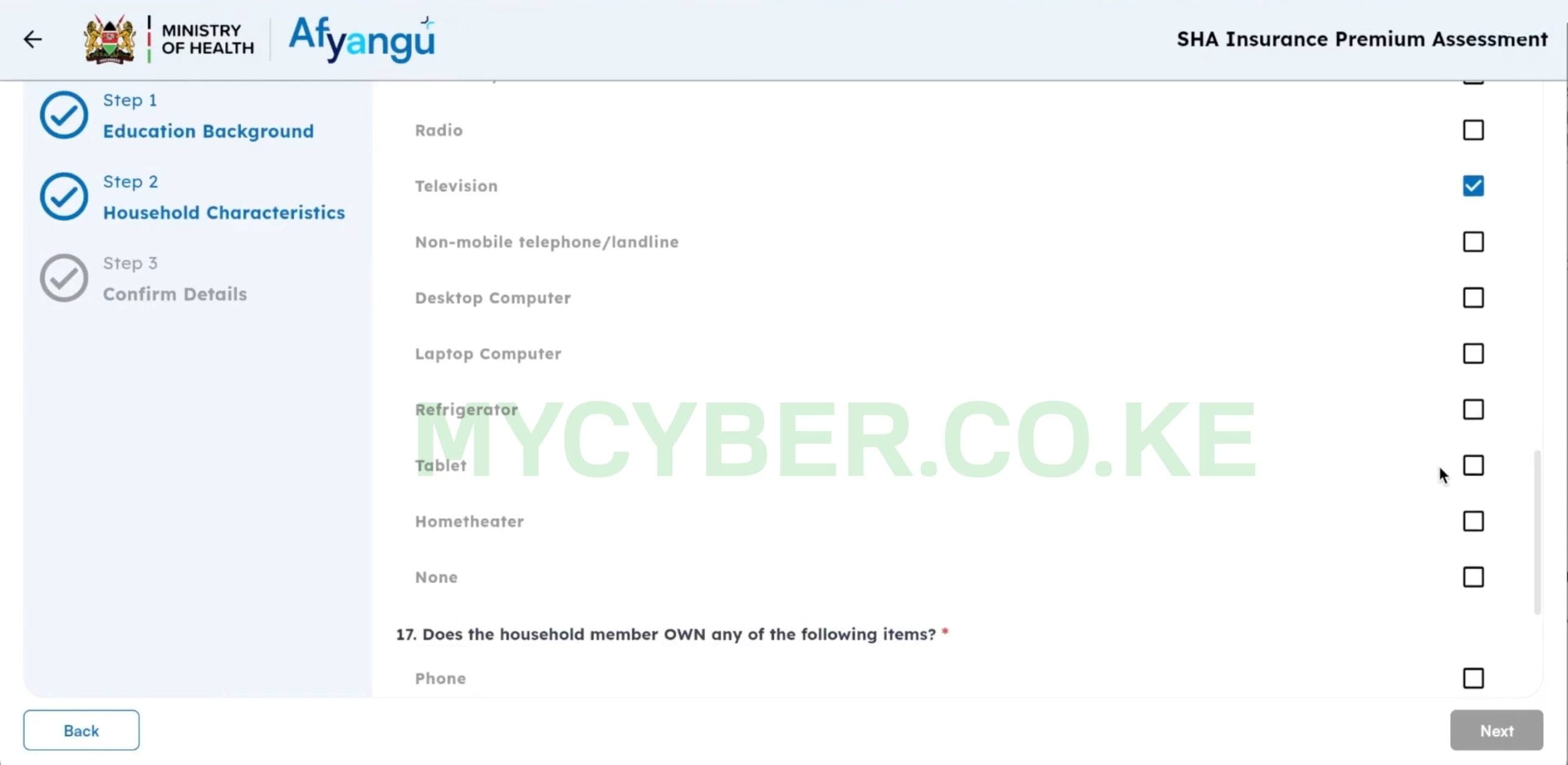
📺 Household Assets — What You Own
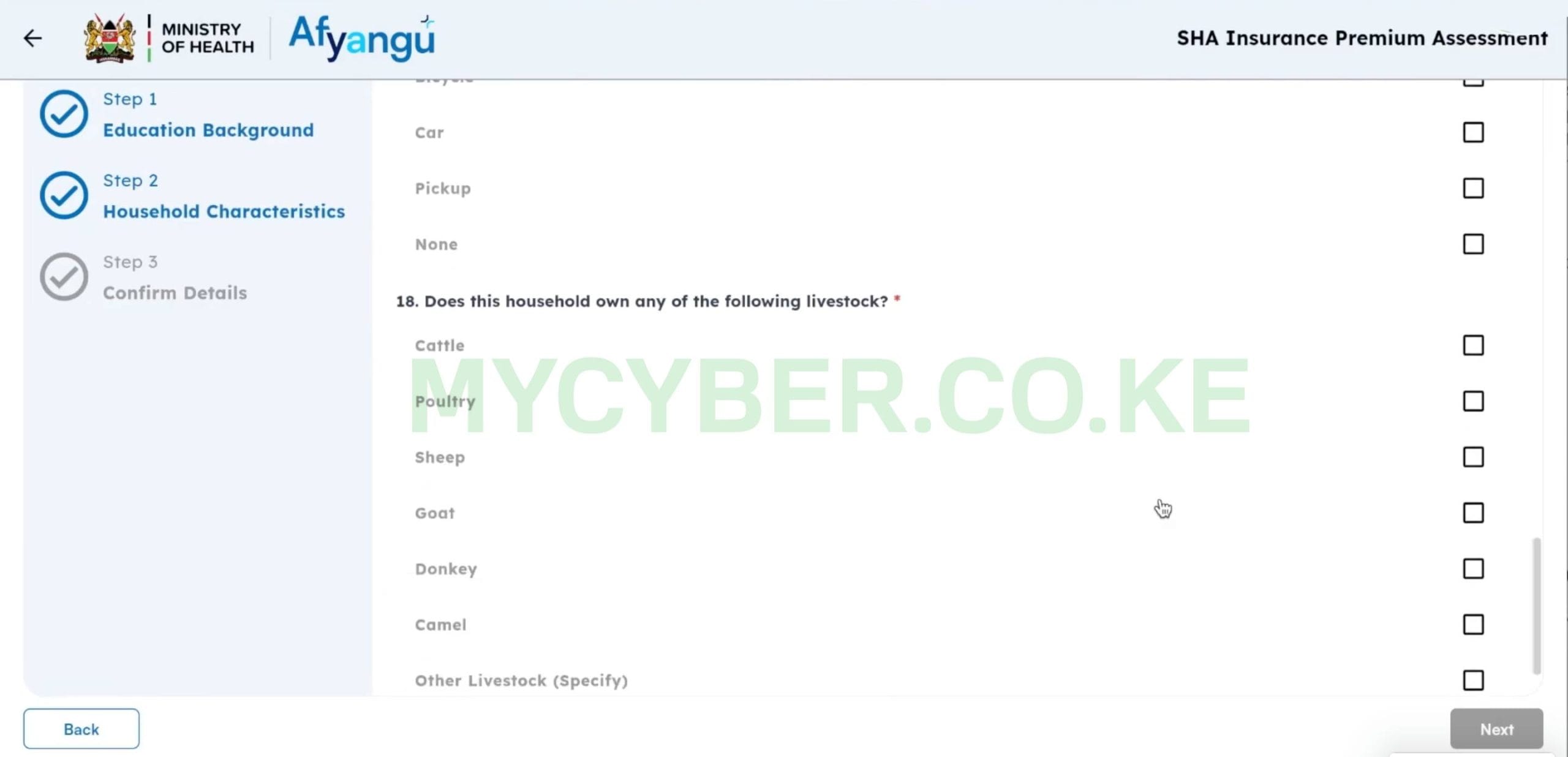
🌾 Land and Technology Use
SHA cross-references your Means Test answers with data from KRA, NTSA, and mobile money providers including M-Pesa. Providing inaccurate answers to lower your contribution amount can result in your registration being flagged or your cover being suspended.
6. Step 3 — Confirm and Submit
After completing all 23 questions in Step 2, the form moves to Step 3 — Confirm Details. This shows you a summary of every answer you provided so you can review before submitting.
Review and Submit
Take your time on this step — once submitted you cannot easily change your answers.
- Read through every answer on the confirmation screen carefully
- If anything is wrong, click Back to return and correct it
- When you are satisfied everything is accurate, click Submit
- The system processes your answers and calculates your monthly contribution
- Your monthly premium amount is displayed on screen — note it down
- Your SHA registration status updates to Active within 24–48 hours
Stuck on the Means Test or not sure how to answer? MyCyber completes the full Means Test for you via WhatsApp for KES 200. We handle all 23 questions and confirm your status shows Active. Read more about our assisted SHA registration service.
Cannot Complete the Means Test Yourself?
Send your National ID number on WhatsApp. We log in, complete all 23 questions correctly, and confirm your SHA status shows Active — the same day.
💬 WhatsApp: 0751 947 7007. What Contribution Amount Will You Get?
After submitting the Means Test, the SHA system calculates your monthly premium based on the algorithm applied to your answers. The amount varies — here is what to generally expect:
| Household Profile | Typical Monthly Contribution |
|---|---|
| Low income — mud house, no assets, no income source | KES 300 – 400 per month |
| Middle — iron sheet roof, rents a flat, owns a TV and phone | KES 400 – 550 per month |
| Average self-employed — national average | KES 592 per month |
| Higher income indicators — owns a car, laptop, tile floor | KES 600 – 900+ per month |
| Vulnerable/indigent — identified as unable to contribute | Subsidised or zero contribution |
Your exact amount is calculated by the SHA algorithm and displayed immediately after submission. The system cannot be negotiated with directly — but if you believe your result is inaccurate, SHA has an appeals process (see FAQ below).
Once you know your monthly amount, pay via M-Pesa Paybill 200222, account number = your National ID number. Keep contributions current every month to avoid your cover lapsing to Inactive.
8. What to Do After Completing the SHA Means Test
Once you have submitted the Means Test, your SHA registration is complete. Here is what to do next:
- Check your status — give it 24–48 hours then check your SHA registration status on afyayangu.go.ke. It should show Active
- Make your first contribution — pay via M-Pesa to Paybill 200222, account = your National ID. You do not need to pay before your status shows Active — the Means Test completion activates your cover
- At the hospital — present your National ID. The hospital’s provider portal verifies your status. If registered within the last 72 hours, wait and retry if not found immediately
- Add your dependants — log into afyayangu.go.ke and navigate to My Dependants to add your spouse, children, or parents to your cover
9. Common Problems and Fixes
Means Test Section Not Showing on My Dashboard
This happens when your *147# registration did not complete properly or there is a mismatch between your phone number and your National ID on the SHA system.
- Log out and log back into afyayangu.go.ke and try again
- If still not showing, dial *147# again from your registered number and follow the prompts to restart registration
- If the problem persists, WhatsApp us — this is a common issue we resolve the same day
Submitted the Means Test But Status Still Shows Pending After 48 Hours
The SHA portal sometimes has a delay between Means Test submission and status update — especially during peak registration periods.
- Wait a full 48 hours after submission before checking
- Log in and check your status on afyayangu.go.ke — it may have updated without a notification
- If still Pending after 48 hours, call SHA on 0800 720 601 (toll-free) and quote your National ID number
Portal Times Out or Freezes During the Assessment
The afyayangu portal occasionally times out mid-assessment, especially on slower connections. Your progress may or may not be saved.
- Log back in and navigate to the Means Test section — check if your answers were saved
- If the form is blank, start again from Step 1 — it takes 10–20 minutes and your previous incomplete attempt does not affect the new one
- Use a stable Wi-Fi connection rather than mobile data to reduce the risk of timeouts
10. Frequently Asked Questions
Can I complete the SHA Means Test on a phone or do I need a computer?
You can complete the SHA Means Test on any smartphone using a browser — no computer is needed. Open Chrome or any browser, go to afyayangu.go.ke, log in, and navigate to the Means Test section. The form is mobile-responsive. Some users find it easier to use a tablet or computer for the longer dropdown sections, but a phone works fine.
I am salaried — do I need to complete the Means Test?
No. If you are a formal employee whose employer deducts SHA contributions from your salary, your contributions are calculated through payroll and you do not need to complete the Means Test. The Means Test is only for self-employed and unemployed Kenyans registering independently.
What if I disagree with the contribution amount the system calculated?
SHA has a built-in appeals process. If you believe your assessment was inaccurate — for example it placed you in a higher category than your actual situation — you can request a review and manual verification. Call the SHA helpline on 0800 720 601 (toll-free) and ask to dispute your Means Test result. Bring any supporting documents that demonstrate your actual socio-economic situation.
How often do I need to redo the Means Test?
You only complete the Means Test once during initial registration. If your socio-economic situation changes significantly — for example you move from self-employment to formal employment, or vice versa — your contribution category may need updating. Contact SHA on 0800 720 601 to request a reassessment if your circumstances change.
Does the SHA Means Test really check with KRA and M-Pesa?
Yes. SHA’s system is designed to cross-reference your answers with data held by KRA (tax records), NTSA (vehicle registration), and mobile money providers including Safaricom M-Pesa. This means if you declare you own no vehicle but NTSA records show one registered in your ID number, the system will flag the discrepancy. Answer honestly.
I completed the Means Test but the hospital says I am not found — what do I do?
The member portal on afyayangu.go.ke updates faster than the hospital provider portal. If you completed the Means Test within the last 72 hours, wait and retry. If longer than 72 hours have passed and the hospital still cannot find you, ask to speak with the hospital’s SHA focal person — not just the front desk. They have deeper access. You can also read our full guide on SHA Contributor Not Found for a complete fix.
Disclaimer: MyCyber is an independent digital assistance service. We are not affiliated with the Social Health Authority (SHA), Afya Yangu, or any government body. All official SHA information should be verified at afyayangu.go.ke or by calling the SHA toll-free helpline 0800 720 601.
