


Confirm Your Request
Please fill in your details to proceed
Service fee · All-inclusive
M-Pesa after message
How to Update Your SHA Phone Number
Quick answer: if the number on your SHA record is mistyped but still belongs to you, correct it. First check what is on record with *147# (Update Details, then Personal Profile) or My Profile. Then correct it using the Update Phone Number card on afyayangu.go.ke, or Update Details on *147#. The corrected number must be an active line registered to your own ID number.
This guide is for correcting a wrong number while you still have the same line. The steps are the same routes you would use to change a number, but the checks are different: you are confirming a typo, not moving to a new SIM.
If you have switched to a new line or lost your SIM, read how to change your SHA phone number instead.
One rule decides if it works: the corrected number must be registered to your own ID. You cannot correct your record with a spouse’s, parent’s or friend’s line. The form states that the number must be valid and registered to your ID number, and it will not go through otherwise.
When an Update Is the Right Fix
- You typed one or more digits wrong when you registered.
- Someone else entered the number for you and made a mistake.
- The number on record is close to yours, but the line you use today is different only by a digit or two.
Before You Correct Anything: Check Your Record
- Dial *147# and enter your ID number.
- Open Update Details, then Personal Profile, to see the details on record. You can also check My Profile from the main menu.
- Compare the number on record with the SIM you use today.
- If they match, you do not need to update. If they differ, continue below.
Method 1: Correct the Number on Afya Yangu (Portal)
Use this route if you want to see each field on screen.
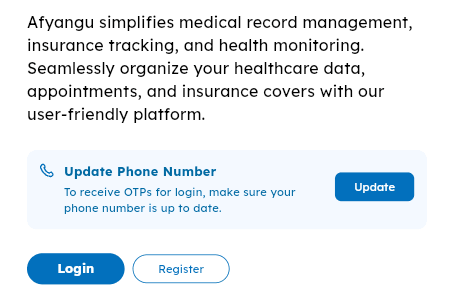
Go to afyayangu.go.ke. On the home screen, above Login and Register, find the Update Phone Number card and tap Update. You do not need to log in first.
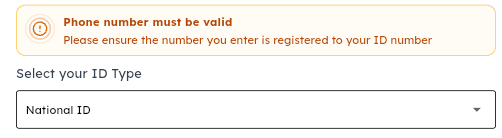
The popup warns that the number must be valid and registered to your ID. Select your ID type from the dropdown, for example National ID.
Type your ID number exactly as it appears on your ID.

Enter the corrected number in the +254 field, in the format 712345678. Check each digit against your SIM before you move on. It must be an active line registered to your own ID.

Check the ID and number once more, then press Submit. SHA sends an SMS confirming the change. Keep that message as proof.

Method 2: Correct the Number on *147#
Use this route if you do not have internet. It works on any phone.
Open your phone dialler and press call.
Choose Kenyan Citizen or Foreign Resident, then type the matching ID number.
Select Update Details, then pick the phone number option.
Type the corrected number, which must be registered to the same ID, and submit. Keep the confirmation SMS.
For the full menu, see the SHA USSD code guide.
What Not to Do
- Do not use someone else’s line, even a relative’s or employer’s. The number must be registered to your ID.
- Do not repeat submissions. Repeated attempts can confuse the record. Wait a few hours if you get no SMS.
- Do not expect a name fix here. A name mismatch needs the personal details route.
- Do not pay anyone to make the correction. Both official routes are free.
If the Update Does Not Go Through
| What you see | What to do |
|---|---|
| “Phone number must be valid” | The number is not an active line registered to your ID. Check the SIM is in your name, and check each digit of the ID and number. |
| Your name or ID does not match | This is a personal details problem, not a phone problem. See how to update your SHA personal details. |
| No confirmation SMS | Wait a few hours, then call SHA on 0800 720 601 or see SHA customer care. |
| Both online routes keep failing | Visit a SHA office or Huduma Centre with your original National ID and the corrected number. Find one through SHA offices near me. |
Why the Right Number Matters
SHA sends login OTPs, PIN resets and notifications to the number on your record. A wrong number means you may not receive codes, which blocks login, adding dependants and checking your status. If codes still do not arrive after you correct the number, see SHA OTP not received.
After You Update
- Confirm the SMS arrived, then log in once to test the corrected number.
- Check your cover status. If it has lapsed, see SHA cover lapsed.
- If the number belongs to an employer account instead, use the employer phone update guide.
Frequently Asked Questions
How do I check which phone number is on my SHA record?
Dial *147#, choose your ID type, enter your ID number, then open Update Details or My Profile to see the details on record. If the number matches a line you still use, you do not need to update it.
What if I typed a wrong digit when I registered?
If the line still belongs to you and works, correct the number with the Update Phone Number card on afyayangu.go.ke or Update Details on *147#. The corrected number must be registered to your ID.
Can I update my SHA number to a relative’s line?
No. The number must be registered to your own ID number. Entering your ID with someone else’s line will fail.
Is an update different from a change?
Yes. An update corrects a wrong number on the same line. A change moves your record to a different line, for example after a new SIM. Use the change guide if your line has changed.
My name is also wrong on SHA. Can I fix it here?
No. Name and ID corrections are handled separately. See how to update your SHA personal details.
Why does the form say the number must be valid?
The number you entered is not an active line registered to the ID you typed. Check each digit against the SIM, and confirm the SIM is registered in your name.
Do I need the old number to correct it?
No. The update uses your ID number and the corrected number. You do not need access to the wrong number.
How long does the update take to show?
You should receive an SMS confirming the change. If no SMS arrives, wait a few hours before trying again, then call SHA on 0800 720 601.
Related SHA Guides
Need Help Correcting Your SHA Phone Number — Instantly
Typo on your record · Wrong digits · Update keeps failing
Tell us your ID type and the number on record on WhatsApp. We will check the fix with you step by step.
Click Here to Get Instant AssistanceDisclaimer: MyCyber (mycyber.co.ke) is an independent educational website. We are not affiliated with the Social Health Authority (SHA), the Ministry of Health, or the Government of Kenya. This article explains SHA procedures based on official sources (sha.go.ke, afyayangu.go.ke), checked on [add date checked on sha.go.ke]. Always verify current requirements directly with SHA before taking action. SHA toll-free: 0800 720 601.
