


How to Get SHA Number in Kenya (Client Registry ID)
To get your SHA number, log in at afyayangu.go.ke, open the My Profile tab and look under your names for the Client Registry ID. That Client Registry ID is your SHA number. It normally starts with CR and ends with example-1 or any other value. You can also click View Application or Download Application to get a PDF that shows the same number with a QR code.
Your SHA number is the number SHA uses to identify you on its system. On Afya Yangu it is called the Client Registry ID, so if you are searching for how to get your SHA number, that is the label to look for. Many people need it while they are at a hospital or filling in a form that asks for it. This guide shows where to find your SHA number, how to download your application PDF, and what to do if you cannot see it.
| What you want | Where to find it |
|---|---|
| Your SHA number | Afya Yangu, My Profile tab, under your names and the date you created the account. It is labelled Client Registry ID. |
| Your registration details | The application PDF. Click View Application or Download Application on your profile. |
| A copy to show at the hospital | Download Application. The PDF carries your Client Registry ID and a QR code. |
What Is an SHA Number?
An SHA number is the number tied to your record with the Social Health Authority. Afya Yangu shows it in your profile as your Client Registry ID, and that is the number people mean when they ask how to get an SHA number.
The Client Registry ID normally starts with CR, is followed by a long run of digits, and ends with example-1 or any other value. When you copy it, copy the whole thing, including the CR(Client Registry) at the start and with example -1 or any other value at the end.
How to Get SHA Number on Afya Yangu (Step by Step)
You need your Afya Yangu login. The steps are the same ones you use to log in to check your SHA registration or contribution history.
Open the Afya Yangu login page to get your SHA number
Go to afyayangu.go.ke/#/auth_login. This is the official Afya Yangu login page.
Log in with your ID number and OTP
Enter your National ID number and the OTP sent to your phone. If the code does not arrive, read SHA OTP not received. If you have never registered, start with SHA registration on Afya Yangu.
Click the My Profile tab
After you log in, click My Profile. Your SHA number is on this page.

Find the Client Registry ID, which is your SHA number
On the right side of the profile page you will see your names. Below your names is the date you created the account, and below that is the Client Registry ID. This is your SHA number. It normally starts with CR and ends with -7.
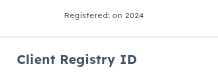
Write down your SHA number exactly as shown
Copy the Client Registry ID in full or write it down, with the CR at the start and the -7 at the end. If you need a copy to show someone, download your application as well.
| What you see on My Profile | What it means |
|---|---|
| Your names | The name on your SHA account |
| The registered date | When you created the account |
| Client Registry ID | Your SHA number |
How to Download Your SHA Number Application (PDF)
If you need to download your SHA number, use the application PDF. It is a copy of the details you submitted when you registered, and it carries your Client Registry ID and a QR code.
- Log in to Afya Yangu and open the My Profile tab.
- Click View Application to look at it, or Download Application to save the PDF.
- Open the PDF and find your Client Registry ID and the QR code.


What Your SHA Number Application PDF Contains
The PDF is titled Application Details. It lists what you entered during registration in three sections, plus a QR code and your Client Registry ID.
Primary Information
Last name, first name and middle name.

Personal Information
Employment status, income band, disability and marital status.

Contact Information
Primary phone, alternative phone, email address, county, sub-county, ward, physical address, postal address and zip code.

Is Your SHA Number the Same as Your ID Number?
No. Your ID number is what you use to register, to log in to Afya Yangu and as the account number when you pay. The SHA number you see in your profile is the Client Registry ID, the one that starts with CR and ends with example -1 or any other value.
Keep both. If a hospital asks for your SHA number, give the Client Registry ID from your profile or show the downloaded application, and carry your original ID as well.
Changed your phone number and cannot log in?
Afya Yangu sends the OTP to the phone number on your SHA record, so an old number blocks you from your SHA number. We update your SHA phone number so you can log in. KES 150 via WhatsApp.
WhatsApp Us — Change SHA Phone NumberIndependent service. Not affiliated with SHA or the government.
Can’t Get Your SHA Number? Here Is What to Do
If you cannot see your SHA number, find your situation below.
| Your situation | What to do |
|---|---|
| You have no Afya Yangu account yet | Register first. Follow SHA registration on Afya Yangu, then come back to My Profile. |
| The OTP does not arrive | Read SHA OTP not received. |
| You changed or lost your phone number | Update the number on SHA. We do it for KES 150 on WhatsApp, or read update your SHA personal details. |
| Registration says ID not found | Read SHA ID not found: causes and how to fix it. |
| You are not sure you are registered, or someone registered you earlier | Use check your SHA registration status. |
| You still cannot get in | Call SHA on 0800 720 601, or visit an SHA office or a Huduma Centre with your original ID. |
After You Have Your SHA Number: Next Steps
Once you have your SHA number, these are the pages people open next.
SHA Number: Frequently Asked Questions
How do I get my SHA number?
Log in at afyayangu.go.ke with your ID number and OTP, click the My Profile tab and read the Client Registry ID below your names and the account creation date. That Client Registry ID is your SHA number.
Is my SHA number my ID number?
No. Your ID number is what you use to register and log in. The SHA number shown in your Afya Yangu profile is the Client Registry ID, which normally starts with CR and ends with -7.
What does an SHA number look like?
It is shown as a Client Registry ID that normally starts with CR, followed by digits, and ends with -7. Copy it exactly as it appears, including the CR and the -7.
How do I download my SHA number?
Log in to Afya Yangu, open My Profile and click Download Application. The PDF lists the details you submitted at registration, a QR code and your Client Registry ID. You can also click View Application to look at it first.
What do I give the hospital if they ask for my SHA number?
Give the Client Registry ID from your profile, or show the downloaded application, which carries the same number and a QR code. Carry your original ID as well.
Can I get my SHA number by SMS or *147#?
We have only confirmed the Client Registry ID in the Afya Yangu profile, so that is the method this guide covers. If you cannot log in, call SHA on 0800 720 601 or visit an SHA office or a Huduma Centre with your original ID.
Can I check my SHA number online without logging in?
We have only found the Client Registry ID after logging in to Afya Yangu. The SHA eligibility checker is for checking your coverage status.
I changed my phone number. How do I get my SHA number?
Afya Yangu sends the OTP to the phone number on your SHA record, so an old number blocks the login. Update the number first. We can do it for you for KES 150, or you can read our guide on updating your SHA personal details.
Do I pay to get my SHA number?
No. Getting your SHA number from your Afya Yangu profile is free. You only need to be able to log in.
Need your family on your SHA account?
We add dependants and spouses to your SHA account. KES 150 each via WhatsApp, Monday to Saturday.
WhatsApp Us — Add Dependant or SpouseUnahitaji msaada? Tuandikie WhatsApp. Independent service. Not affiliated with SHA or the government.
Disclaimer: MyCyber is an independent digital assistance service, not affiliated with SHA or any government body. Requirements can change. Verify current details on sha.go.ke, afyayangu.go.ke, or by calling 0800 720 601.
Data protection: By messaging MyCyber on WhatsApp, you agree to our data protection terms and conditions.
