



How to Check Your NSSF Number Using USSD (*303#)
Want to check NSSF number using USSD without any internet connection? NSSF runs an official USSD code, *303#, that works on any phone — including basic feature phones. Here’s the exact screen-by-screen process, using NSSF’s real USSD menu.
Dial *303# on your phone, select option 5, Check Your NSSF Number, from the welcome menu, enter your National ID number, and press send. Your name and NSSF number appear on the next screen.
- Open your phone’s dialer
- Dial *303# and press call/send
- Read the Welcome to NSSF USSD Service menu
- Select option 5, Check Your NSSF Number
- Enter your National ID number and send
- View your name and NSSF number
This is NSSF’s own free service. The *303# USSD code is an official NSSF channel that works on Android, iPhone, or any basic feature phone — no internet or WhatsApp required, just normal call/dial functionality.
Open Your Phone Dialer
On an Android phone, open either your native dialer app or the Truecaller dialer if that’s what you use. On a feature phone, open the regular call/dial screen. The process is identical either way.

Opening the dialer to enter the NSSF USSD code.
- Open the native dialer or Truecaller dialer on Android, or the dial screen on a feature phone
Dial *303#
Type in the NSSF USSD code and press the call/send button, exactly as you would to make a phone call.
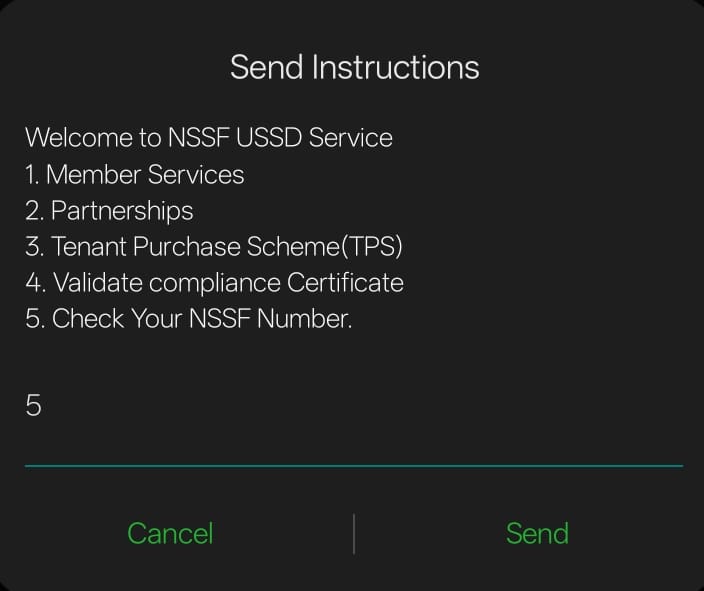
The Welcome to NSSF USSD Service menu that appears after dialing *303#.
- Type *303# and press call/send
- Wait for the “Welcome to NSSF USSD Service” menu to load
- You’ll see 5 options: Member Services, Partnerships, Tenant Purchase Scheme (TPS), Validate Compliance Certificate, and Check Your NSSF Number
Select “Check Your NSSF Number”
From the menu, reply with the number for the option you want.

The “Check your NSSF Number” screen, prompting for your National ID number.
- Reply with 5 for “Check Your NSSF Number”
- The next screen will show “Check your NSSF Number” and ask for your National ID number
Enter Your National ID Number
Type your National ID number exactly as it appears on your ID card, then send it to continue.
- Enter your National ID number using your keypad
- Press send/OK to submit it
View Your Name and NSSF Number
The next pop-up screen displays your name and your NSSF number, pulled directly from NSSF’s records.
- Note down or screenshot your NSSF number for your records
- Use the same code any time you need to check it again
Make sure you typed the code exactly as *303# and pressed the call/send button rather than just typing it into a text field. If nothing happens, check that your SIM has active network coverage — USSD needs signal but not data or WiFi. If it still fails, try NSSF’s WhatsApp chatbot on 0704 303 303 as an alternative way to check the same information.
Frequently Asked Questions
What is the NSSF USSD code to check my number?
Dial *303# on your phone, select option 5, Check Your NSSF Number, from the welcome menu, then enter your National ID number and send. Your name and NSSF number are displayed on the next screen.
Does the NSSF USSD code work on a feature phone?
Yes. The *303# USSD code works on any mobile phone that can make calls, including basic feature phones, since USSD does not require internet access.
Is checking my NSSF number using USSD free?
NSSF does not charge for the service itself, though your mobile network may apply a small standard USSD session charge, similar to other USSD codes like M-Pesa or airtime balance checks.
What if *303# doesn’t work on my phone?
Confirm you typed the code exactly as *303# and pressed the call or send button, not just typed it. If it still fails, check that your SIM has network coverage, or try the NSSF WhatsApp chatbot on 0704 303 303 as an alternative.
Can I use *303# for anything besides checking my NSSF number?
Yes. The same USSD menu also offers Member Services, Partnerships, the Tenant Purchase Scheme (TPS), and Compliance Certificate validation.
Disclaimer: MyCyber is an independent digital assistance service, not affiliated with NSSF or any government body. The USSD code *303# is NSSF’s own official channel. Always verify current details on nssf.or.ke directly.
Data protection: By messaging MyCyber on WhatsApp, you agree to our data protection terms and conditions.
