


How to Add Spouse on SHA (Even Without a Marriage Certificate)
If you’re wondering how to add spouse on SHA and worried you can’t because you don’t have a marriage certificate — you can. SHA accepts two other documents most people have never heard of. Here’s the full process, plus exactly what to do if a certificate isn’t something you have.
No marriage certificate? You may still have a path forward. A marriage certificate is SHA’s standard proof of marriage, but a statutory affidavit or a letter from your area chief can serve as alternatives if you don’t have one — see the dedicated section below before you start.
Make sure your own SHA registration is fully confirmed, log in at sha.go.ke, go to My Profile → Dependants → Add Spouse, enter their details, upload a marriage certificate (or affidavit / chief’s letter), have your spouse enter the OTP sent to their phone, then submit and wait for approval.
- Confirm your own SHA registration is complete
- Log in and open the Dependants section
- Select “Add Spouse”
- Choose your proof-of-marriage document
- Enter your spouse’s details exactly as on their ID
- Have your spouse enter the OTP sent to their phone
- Upload your documents (under 2MB)
- Submit and wait for approval (up to 7 business days)
No Marriage Certificate? Here’s What SHA Accepts
This is the part most guides skip, and it’s the reason a lot of Kenyans never finish adding their spouse. SHA’s primary and most straightforward proof of marriage is a marriage certificate. But if you were married customarily or traditionally and never formalized the paperwork, you’re not automatically excluded — a legal affidavit or a letter from your area chief can serve as an alternative, based on guidance published by Kenyan health-service resources.
-
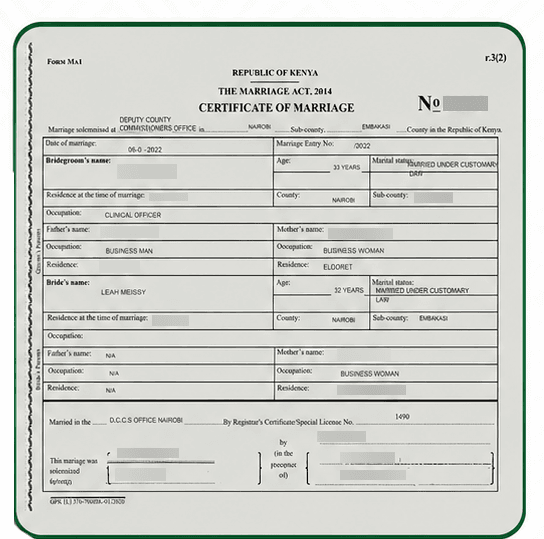
Marriage certificate — the standard, most direct document. If you have one, this is the simplest option and needs no further explanation.

Example of a Kenyan marriage certificate accepted by SHA.
-
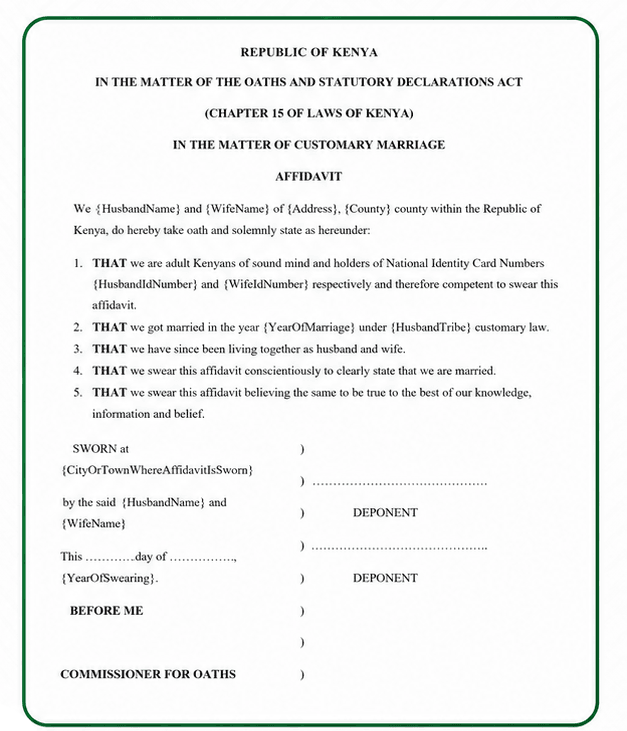
Statutory affidavit — sworn before a commissioner of oaths, confirming you are married. If you don’t have a certificate, this is the more commonly used alternative. Cost and turnaround vary by law firm, so confirm both directly before you go.
Example of a statutory marriage affidavit accepted by SHA.
- Letter from your area chief — a letter confirming the marriage, obtained from your local chief’s office. Processing time depends on your chief’s office, so it’s worth asking them directly rather than assuming a fixed timeline.
Complete Your Own SHA Registration First
The Dependants section only appears on your profile once your own registration is fully confirmed. If your registration is still showing as incomplete or pending, SHA will block you from adding anyone else.
- Check that your own SHA status shows as active, not pending
- If it’s still pending, resolve that first before attempting to add your spouse
Log In and Open the Dependants Section
Once your own registration is confirmed, log in and navigate to where dependants are managed.
- Go to sha.go.ke and log in
- Go to My Profile, then Dependants
Select “Add Spouse”
From the Dependants section, choose the option specifically for adding a spouse, rather than a child or other dependant type.
- Click “Add Dependant”
- Select “Spouse” as the relationship type
Enter Your Spouse’s Details
Type your spouse’s name and ID number exactly as they appear on their National ID — this is checked against IPRS, so even small mismatches cause rejections.
- Enter their full name exactly as printed on their ID
- Enter their National ID number carefully
- Enter a working phone number registered to them
Have Your Spouse Enter the OTP
SHA sends a one-time code to your spouse’s phone to confirm their consent to being added. This code expires in 5 minutes, so timing matters.
- Before starting this step, confirm your spouse’s phone is on, charged, and nearby
- Have them read out or enter the OTP as soon as it arrives
Upload Your Documents
Upload whichever proof-of-marriage document you’re using — marriage certificate, affidavit, or chief’s letter (see the sample marriage certificate and sample affidavit above if you’re not sure what these look like). SHA has a strict 2MB file size limit per document.
- Compress your document photo using a free tool like ilovepdf.com if it’s over 2MB
- Upload the compressed file
Submit and Wait for Approval
Once submitted, your spouse’s status will show as “Pending” while SHA verifies the details against Civil Registration records. This is normal and does not mean anything went wrong.
- Wait at least 7 business days before following up
- You’ll receive an SMS once your spouse is approved and active
A name typed differently from the ID is the single biggest cause of rejection — check it character by character. Refreshing the page mid-submission wipes your progress and can create a broken partial record, so if the portal is slow, wait rather than refresh. And don’t resubmit just because status shows “Pending” — that’s normal and resubmitting creates a duplicate that then needs to be manually cleared.
Prefer Not to Navigate the Portal Yourself?
Message us on WhatsApp with your spouse’s details and whichever document you have — marriage certificate, affidavit, or chief’s letter — and we’ll guide you through adding them, including if you have no certificate at all.
💬 WhatsApp: 0751 947 700We never ask for your SHA password — you stay logged in and in control throughout.
Frequently Asked Questions
How do I add my spouse to SHA online?
Log in at sha.go.ke, go to My Profile then Dependants, select Add Spouse, enter their details, upload your proof-of-marriage document, and have your spouse enter the OTP sent to their phone to confirm consent.
Can I add my spouse to SHA without a marriage certificate?
Yes. SHA also accepts a statutory affidavit from a commissioner of oaths or a letter from your area chief confirming the marriage, as alternatives to a marriage certificate.
Can I add my spouse to SHA using my phone?
Yes. The SHA portal works in a mobile browser, so you can complete the entire spouse registration process from your phone without needing a computer.
How long does SHA take to approve a spouse dependant?
Approval typically takes anywhere from a few hours up to 7 business days, since SHA verifies the submission against Civil Registration records before activating your spouse’s cover.
What if my spouse’s OTP doesn’t arrive?
Confirm their phone has signal and the correct number was entered. The OTP expires after 5 minutes, so if it doesn’t arrive in time you’ll need to restart that step and request a new one.
Need Help Adding Your Spouse to SHA?
Message us on WhatsApp — with or without a marriage certificate — and we’ll guide you through it, usually within 30 minutes.
💬 WhatsApp: 0751 947 700We only ever contact you from 0751 947 700, and we never ask for your password.
Disclaimer: MyCyber is an independent digital assistance service, not affiliated with SHA or any government body. Adding a spouse on SHA is free to do yourself at sha.go.ke. Always verify current details on sha.go.ke or by calling 0800 720 601.
Data protection: By messaging MyCyber on WhatsApp, you agree to our data protection terms and conditions.
