


Generate Your Lipa na Mpesa Poster
in Under 5 Seconds
Enter your till number, paybill, or agent number — your print-ready poster downloads instantly. No email. No watermark. 100% free.
Generate Layout
Please enter 7 digits.
1. How to Create Your M-Pesa Poster
You are wondering how you can get your free Mpesa Poster Generator. Generate your official Safaricom Lipa na Mpesa or Agent poster in less than 5 seconds. No email required. No registration needed. Our free Mpesa poster generator online works entirely in your browser — no app to install, no account to create.
Get Your Free Mpesa Poster in 3 Steps
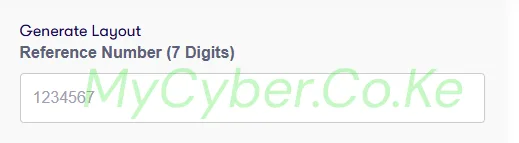
This is your Safaricom-assigned reference number — 7 digits for Buy Goods Till Numbers. The same field works for Paybill numbers and Agent numbers.
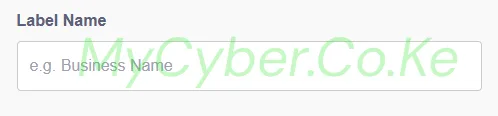
Use the exact name your customers will see when they confirm payment in Mpesa — it should match your registered business name with Safaricom.
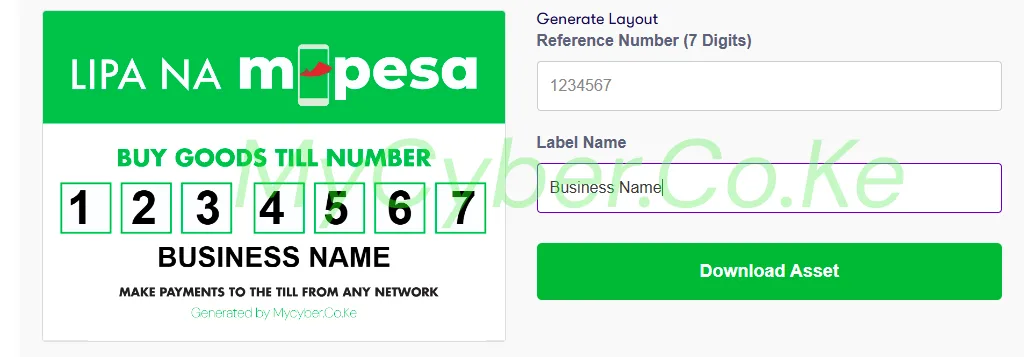
Your Lipa na Mpesa poster generates instantly. Click the green Download Asset button to save it to your phone or PC as a high-resolution PNG — ready to print.
2. Why Use Our Free Mpesa Poster Generator?
Unlike other tools that require you to fill out long forms or submit your email address, our 2026 M-Pesa Poster Generator runs entirely in your browser. Whether you need a Mpesa till number poster generator, a Mpesa paybill poster generator, or a Mpesa agent poster generator — this single tool handles all three instantly.
- Instant Preview: See exactly how your poster looks before you download.
- Privacy First: We do not store your data or ask for your phone number.
- Print Ready: The output is high-resolution, perfect for printing on A4 or A5 paper for your shop wall.
- Free Mpesa Poster Generator — No Watermark: Your downloaded poster is completely clean — no branding added.
- Works for All Types: Till Number (Buy Goods), Paybill, Agent Number, Pochi la Biashara — one generator, all poster types.
- Mpesa Poster Generator PDF & PNG: Download as a high-resolution PNG ready for any print shop in Kenya, or save directly to your phone gallery.
- Works on Mobile: Open on any smartphone or tablet — generate and download your poster from your phone in seconds.
3. What Is an M-Pesa Poster?
An M-Pesa poster (often called a Buy Goods sticker, Till Number sticker, or Lipa na Mpesa sticker) is a mandatory display for businesses in Kenya. It allows customers to quickly identify your Store Number and Business Name to make payments via Safaricom.
A clear, professional poster builds trust and ensures customers don’t send money to the wrong number.
Every business that accepts Mpesa payments — whether via a Buy Goods Till Number, a Paybill number, or an Mpesa Agent number — needs a clearly printed, readable poster displayed at the point of sale. Our free Mpesa poster generator online free tool means you can create and download your Mpesa poster in under 5 seconds, without visiting a print shop or hiring a designer.
💡 Did you know? Traffic to the wrong Mpesa number is one of the most common customer complaints in Kenyan businesses. A professionally printed, clearly visible Mpesa poster eliminates this problem instantly and reduces the time your staff spend reversing wrong payments.
4. Types of Mpesa Posters You Can Generate
Our free Mpesa poster generator supports all official Safaricom Lipa na Mpesa payment types used by Kenyan businesses:
| Poster Type | Who Uses It | What to Enter |
|---|---|---|
| Mpesa Till Number Poster (Buy Goods) | Shops, restaurants, supermarkets, all businesses accepting Buy Goods payments | Your 7-digit till number + business name |
| Mpesa Paybill Poster Generator | Businesses receiving payments directly to a bank account via Paybill | Your Paybill number + business name |
| Mpesa Agent Poster Generator | Registered Safaricom agents | Your agent number + business name |
| Pochi la Biashara Poster Generator | Small traders receiving payments to their Mpesa line | Your Pochi number + business name |
| Mpesa Send Money Poster | Businesses displaying a personal or business Mpesa number | Your phone number + business name |
5. How to Download Your Mpesa Poster Free
Downloading your Mpesa poster free is simple. Once you have entered your till number or paybill number and your business name in the Mpesa poster generator online above, click the green Download Asset button. Your poster will save instantly to your device as a high-resolution PNG image — no email, no signup, no watermark.
Open the downloaded PNG on your phone or PC, then use the Print function and select “Save as PDF” as the destination. Most print shops in Kenya also accept PNG files directly — just send it via WhatsApp and they will print it on the spot.
6. How to Print Your Mpesa Poster in Kenya
Once you download your Mpesa poster using our free Mpesa poster generator free download tool, here is how to print it in Kenya:
- Print Size: A4 (210 × 297mm) is the standard for shop walls and counters. A5 works for smaller spaces.
- Paper Type: Glossy paper gives the best result — colours are vivid and the poster looks professional.
- Lamination: Ask the print shop to laminate it. This protects it from water, grease, and daily wear. Costs between KSh 50 and KSh 80 extra.
- Where to Print: Any cyber café or print shop in Kenya with a colour printer. Average cost: KSh 50–150 for an A4 colour Mpesa poster print with lamination.
- Share via WhatsApp: Send the downloaded PNG to a print shop via WhatsApp — most print shops in Kenya accept files this way.
💡 Pro tip: Print at least two copies — one for your counter and one as a backup in case the first one gets damaged. The second one costs almost nothing extra since the design file is already with the print shop.
7. Editable Mpesa Till Template — Is It Customisable?
Yes. Our editable Mpesa till template lets you enter any 7-digit till number and any business name. The poster updates in real time in the preview panel. You can generate as many posters as you need — for different till numbers, different branches, or different business names — all free, all instant.
Unlike static PDF templates that you download and try to edit in Word or Canva, our Mpesa poster generator online generates a perfectly formatted, print-ready poster every single time — no design skills needed, no software to install.
Double-check your 7-digit till number before downloading and printing. An incorrect till number on your poster means customers send money to the wrong account. Verify your till number by dialling *334# or checking your Safaricom merchant confirmation SMS.
8. Bank Mpesa Paybill Poster Generators
In addition to the Safaricom Lipa na Mpesa poster generator above, MyCyber also offers free poster generators for the major bank Mpesa paybill numbers in Kenya. If your business bank account is with any of the following banks, download your bank paybill poster free:
- Family Bank Poster Generator — Lipa na Family, Paybill 222111. Free, instant, print-ready A4.
- Equity Bank Poster Generator — Pay with Equity, Paybill 247247. Free, instant, print-ready A4.
- I&M Bank Poster Generator — Lipa na I&M Bank, Paybill 542542. Free, instant, print-ready A4.
💡 All three bank poster generators are free, instant, no email, no watermark — the same as this Mpesa poster generator free tool. If your bank is not listed above, more bank poster generators are coming soon.
9. Frequently Asked Questions — Mpesa Poster Generator Kenya 2026
Is this Mpesa poster generator tool free?
Yes, this generator is 100% free for all Kenyan agents and merchants. No email required. No registration needed. No watermark on the downloaded poster. It is a completely free Mpesa poster generator online free tool — always has been, always will be.
Does it work for Mpesa Agents?
Yes, simply enter your Agent Number in the number field. The Mpesa agent poster generator works exactly the same way — enter your agent number, enter your business name, and download your agent poster instantly as a high-resolution PNG.
Can I use it for Paybill?
Yes. The layout supports standard Paybill numbers. Use our Mpesa paybill poster generator by entering your Paybill number in the reference number field and your business name, then download instantly — free, no watermark.
Can I use it for Pochi la Biashara?
Yes. Enter your Pochi la Biashara number in the reference field and your business name. Download your Pochi la Biashara poster instantly — free, no watermark, print-ready A4.
How do I get a Mpesa poster PDF free download?
Click the Download Asset button to save your poster as a high-resolution PNG image. To get a Mpesa poster PDF, open the PNG on your phone or PC and use the Print function — select “Save as PDF” as the destination. Most print shops in Kenya also accept PNG files directly via WhatsApp.
What size should I print my Mpesa poster?
A4 (210 × 297mm) is the recommended size for shop walls and service counters. A5 works for smaller displays. Always request lamination from your print shop to protect the poster from water, dust, and daily handling.
Is there a watermark on the downloaded Mpesa poster?
No. Our free Mpesa poster generator no watermark tool produces a completely clean poster — what you see in the preview is exactly what you download and print. No logos added, no extra branding, nothing.
Does this work on mobile phones?
Yes. The Mpesa poster generator online works perfectly on all smartphones and tablets. Open the page on your phone, enter your details, and download the PNG directly to your phone gallery. You can then WhatsApp it to a print shop or walk in with it on your phone screen.
How is this different from other Mpesa poster generators?
Most other tools require you to submit your email, register an account, or download a separate app. Our Mpesa poster generator free tool runs 100% in your browser — no forms, no email, no app. It also supports all Mpesa payment types: Till Number (Buy Goods), Paybill, Agent, and Pochi la Biashara — all from one page.
What is a Lipa na Mpesa sticker?
A Lipa na Mpesa sticker — also called a Mpesa poster, Mpesa till sticker, or Buy Goods sticker — is a printed display that businesses put up at their counter or shop wall. It shows the Mpesa till number or paybill number and the business name so customers know exactly where to send money. Our free Lipa na Mpesa sticker generator lets you create one instantly.
Do you offer bank paybill poster generators too?
Yes. In addition to this Safaricom Mpesa poster generator, MyCyber offers free poster generators for Family Bank (Paybill 222111), Equity Bank (Paybill 247247), and I&M Bank (Paybill 542542). All are free, instant, and print-ready with no watermark.
Need Help Printing or Setting Up Your Mpesa Till Number?
We help you register for a Mpesa Buy Goods Till Number, set up your Mpesa merchant account, or print and deliver your poster anywhere in Nairobi.
💬 WhatsApp Us — 0751 947 700Independent online cyber service. Not affiliated with Safaricom or any government body.
Disclaimer: This is an independent free Mpesa poster generator provided by MyCyber.co.ke. We are not affiliated with Safaricom, Mpesa, or any government body. Always verify your till number, paybill number, or agent number with Safaricom before printing and displaying your poster. For official Safaricom merchant support, call 0722 000 000 or visit any Safaricom Shop.
