


Confirm Your Request
Please fill in your details to proceed
Service fee · All-inclusive
M-Pesa after message
How to Reset SHA PIN — Forgot Your Afya Yangu PIN? (2026)
Here is how to reset SHA PIN if you forgot it and cannot log in to Afya Yangu. You tap Reset PIN on the login screen, choose your ID type, enter your ID number and follow the prompts. This guide shows each screen.
Afya Yangu signs you in with a 4-digit PIN, so if you are searching for a SHA password reset, this is the one you need.
⚡ Quick Answer: how to reset SHA PIN — open afyayangu.go.ke/#/auth_login, go to the PIN screen, tap Reset PIN under “Forgot your PIN?”, select your ID type, enter your ID number and click Proceed. Then set a new 4-digit PIN.
🔁 Good to know: the login on sha.go.ke takes you to the Afya Yangu login page, so the steps below are the same wherever you start.
What You Need Before You Start
- The ID type and ID number your SHA account was registered with
- The phone number on your SHA account within reach, since SHA uses it to verify you
- A new 4-digit PIN you will remember
If you cannot reach that phone number, fix it first. See how to reset SHA PIN when you have lost your number below.
How to Reset SHA PIN on Afya Yangu (Step by Step)
Go to afyayangu.go.ke/#/auth_login. If you start from sha.go.ke and click Login, SHA takes you to this same page. Choose your ID type and enter your ID number until you reach the PIN screen.
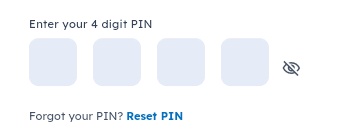
Under the four PIN boxes you will see “Forgot your PIN?” with a Reset PIN link. Tap it. The eye icon beside the boxes only shows or hides the PIN you type.
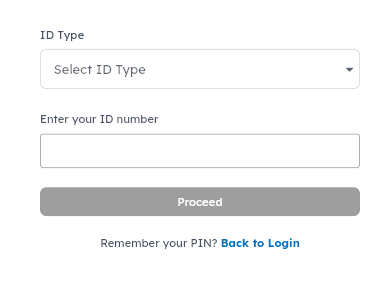
The reset screen asks for an ID Type and your ID number. Tap Select ID Type to open the list.
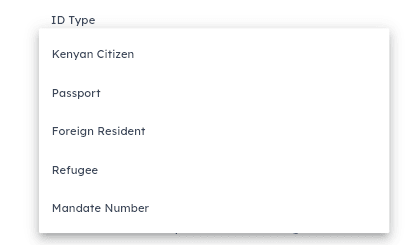
Pick one of Kenyan Citizen, Passport, Foreign Resident, Refugee or Mandate Number. Choose the type you registered with.
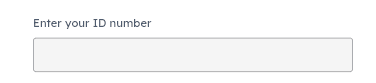
Type the number that matches the ID type you chose, exactly as it appears on your document.
The Proceed button stays grey while the fields are empty. Once both are filled, press it. If you remember your PIN after all, tap Back to Login.

Follow the on-screen prompts. SHA verifies it is you using the phone number on your account, then lets you set a new 4-digit PIN. Log in with the new PIN to test it.
Which ID Type Should You Choose?
This is the step that trips most people when they learn how to reset SHA PIN. Pick the type your account was registered with.
| ID type | Use it if your account was registered with… |
|---|---|
| Kenyan Citizen | Your Kenyan national ID |
| Passport | A passport number |
| Foreign Resident | An Alien ID number |
| Refugee | A refugee ID |
| Mandate Number | A mandate number |
How to Reset SHA PIN When You Have Lost Your Phone Number
The reset depends on the phone number on your account. If that line is lost, inactive or replaced, update the number first, then reset the PIN.
Two official ways to update it: dial *147# and choose Update Details, or tap Update on the Update Phone Number card on the Afya Yangu home screen. The full steps are in our guide on how to change your SHA phone number. The new number must be registered to your own ID.
If Your SHA PIN Reset Does Not Work
Proceed stays grey
Choose an ID type and enter your ID number. Both fields must be filled before the button turns active.
No code arrives
The number on your account may be old. Update it with the steps above, then try again.
ID not accepted
Check that the ID type matches how you registered, and that every digit is correct.
Remembered your PIN
Tap Back to Login and sign in normally. Need help with that? See the Afya Yangu login guide.
After You Reset Your PIN
Now that you know how to reset SHA PIN, the next time takes about a minute. Run through this short checklist first.
- Log in with the new PIN to confirm it works
- Check your cover with how to check your SHA status
- Add family via SHA dependants registration
- Keep your phone number current. That is what makes the next PIN reset easy
Frequently Asked Questions
How to reset SHA PIN — what are the steps?
Go to afyayangu.go.ke, reach the PIN screen, tap Reset PIN under “Forgot your PIN?”, choose your ID type, enter your ID number, click Proceed, and follow the prompts to set a new 4-digit PIN.
I forgot my SHA PIN. What should I do?
Use the Reset PIN link on the Afya Yangu login page. You only need your ID type and ID number to start the reset.
Is there a password on Afya Yangu, or only a PIN?
The login screen asks for a 4-digit PIN, not a password. People searching for “SHA password reset” are looking for the PIN reset described above.
Where does the sha.go.ke login take me?
It takes you to the Afya Yangu login page at afyayangu.go.ke/#/auth_login. The Reset PIN link is on that page.
I forgot my PIN and my old phone number no longer works. What now?
The reset relies on the phone number on your SHA account, so update that first. You can change it with *147# or the Update Phone Number card on the Afya Yangu home screen. See how to change your SHA phone number, then reset your PIN.
Which ID type should I choose?
Choose the type your SHA account was registered with: Kenyan Citizen, Passport, Foreign Resident, Refugee or Mandate Number.
Why is the Proceed button grey?
It stays grey until you have chosen an ID type and entered your ID number. Fill both fields and it becomes active.
How long is the SHA PIN?
It is 4 digits. Tap the eye icon beside the boxes to check what you typed.
I did not receive a code. What should I do?
Check that the number on your SHA account is the one in your hand. If it is old or inactive, update it first through the phone number guide.
Does resetting my PIN affect my cover or dependants?
No. The PIN is only how you sign in. Your cover and dependants are not changed by a PIN reset.
Disclaimer: MyCyber (mycyber.co.ke) is an independent educational website. We are not affiliated with the Social Health Authority (SHA), the Ministry of Health, or the Government of Kenya. This article explains SHA procedures based on official sources (sha.go.ke, afyayangu.go.ke). Always verify current requirements directly with SHA before taking action. SHA toll-free: 0800 720 601. Source: SHA official portal, Afya Yangu portal, Social Health Insurance Act 2023.
